

Most modern apps are designed so users do not need to log in every time they open them. After the first login, the app saves a small piece of data called a session cookie or session token. This token tells the app that the user has already verified their identity.
As long as that token remains valid, the app keeps the user logged in. This is why people can open email, work chat tools, streaming services, or social apps without entering a password for weeks or months. This design improves convenience, but it also means that access remains open long after the original login.
How Entertainment Apps Influence User Behavior
Many security protections are tied to the login process. Password checks, multi-factor authentication, and location or device checks usually happen only when a user signs in.
Entertainment platforms influence how people think about logins. Streaming services, gaming platforms like arabiccasinos.com, and social media apps are designed to keep users continuously signed in.
Over time, users become accustomed to the idea that staying logged in is normal and safe. That expectation carries over to work accounts when the same devices and browsers are used. Users are less likely to question whether an account should still be logged in, even on shared or older devices.
This influence is behavioral rather than technical. The platforms themselves are not necessarily insecure, but they shape habits that reduce awareness of session risk.
How Attackers Exploit Persistent Sessions
Attackers have adjusted their methods to match this behavior. Instead of stealing passwords, many now steal active login sessions directly from devices. This technique is known as session hijacking.
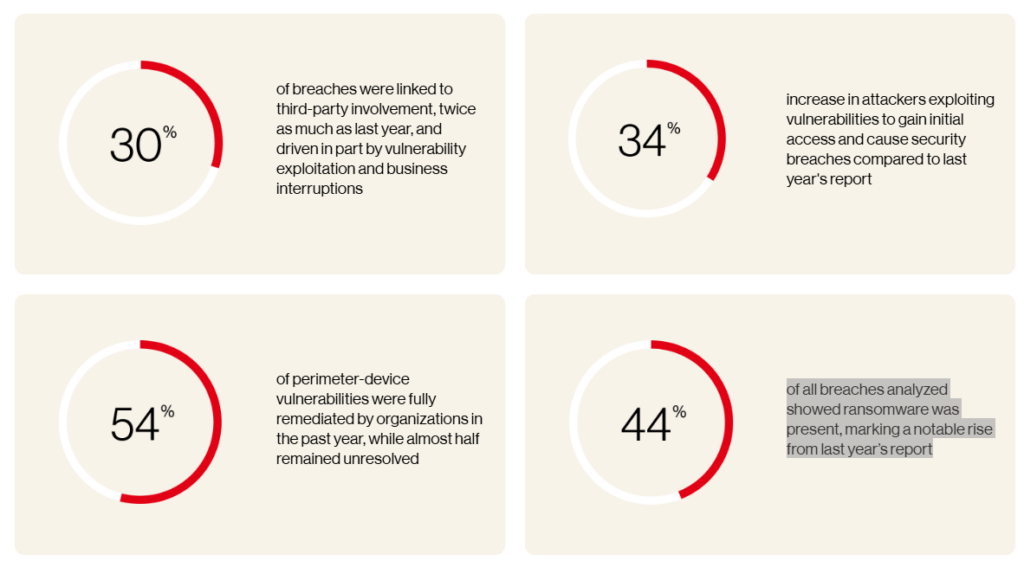
The 2023 Verizon Data Breach Investigations Report found that ransomware was present in 44 percent of all breaches analyzed, a significant increase from the previous year’s report.
When attackers steal a session token, they do not need the password or the multi-factor code. The system believes the attacker is already authenticated. This makes the attack easier to carry out and harder to detect.
Why Work Devices Are Especially Vulnerable
The risk increases because many people use work devices for personal activities. An HP Wolf Security study found that 70 percent of office workers use company-issued devices for personal browsing, including entertainment and media consumption.
Personal browsing exposes devices to malicious advertisements, fake downloads, and browser extensions that can steal session data. If a browser stores active sessions for work email, internal tools, and cloud services, malware only needs to copy those tokens to gain access.
This explains why account compromise can happen even when strong passwords and multi-factor authentication are in place.
Why Session Hijacking Is Hard to Detect
Session hijacking is difficult to spot because the activity looks legitimate. The attacker uses a valid session from a trusted device and does not trigger suspicious login attempts. Security systems see normal behavior rather than clear warning signs.
Mandiant, a major incident response firm, has documented that many modern attacks happen after authentication. Attackers operate within valid sessions rather than breaking in through logins.
This often leads to longer dwell time, meaning attackers remain inside systems for longer.
IBM Cost of a Data Breach report shows why this matters. Organizations that took longer to detect breaches faced average costs of $4.4 million.
Image: Infograph showing four metrics: average data breach cost of $4.4M, high prevalence of AI security incidents, limited AI governance adoption, and $1.9M in savings tied to AI security use | Source: IBM
Why Login-Based Zero Trust Falls Short
Zero Trust security is often described as continuous access verification, but many implementations still focus primarily on login events. Conditional access policies commonly check risk factors only when the user signs in.
If sessions last for weeks, those checks are not repeated even when conditions change. The National Institute of Standards and Technology warns that long session lifetimes increase exposure to session theft and recommends rechecking access when risk changes.
What Needs to Change
Persistent login is not going away because users expect convenience and businesses depend on it. The issue is not that sessions persist, but that they are rarely treated as a security control.
Organizations need to limit session lengths for sensitive accounts, recheck access when context changes, and ensure stolen sessions can be revoked quickly. Users also need to understand that remaining logged in does not mean remaining protected.
When access persists beyond the conditions that justified it, security gaps arise. Addressing session risk is now essential, not optional.